 Simple Pay Application
Pay application: what it is and what goes in it
A pay application is the bill a contractor sends each period on a construction job. It shows the work done to date on every line of the schedule of values, takes off retainage and earlier payments, and states the amount due now. It has two parts: a summary page and a continuation sheet with one row per line.
Subs send pay apps to the GC, and GCs roll them into their own pay app to the owner. Because the GC checks every line before money moves, a pay app is less an invoice than a small set of books for the job. This guide walks through one, figure by figure, using the second month of a drywall job.
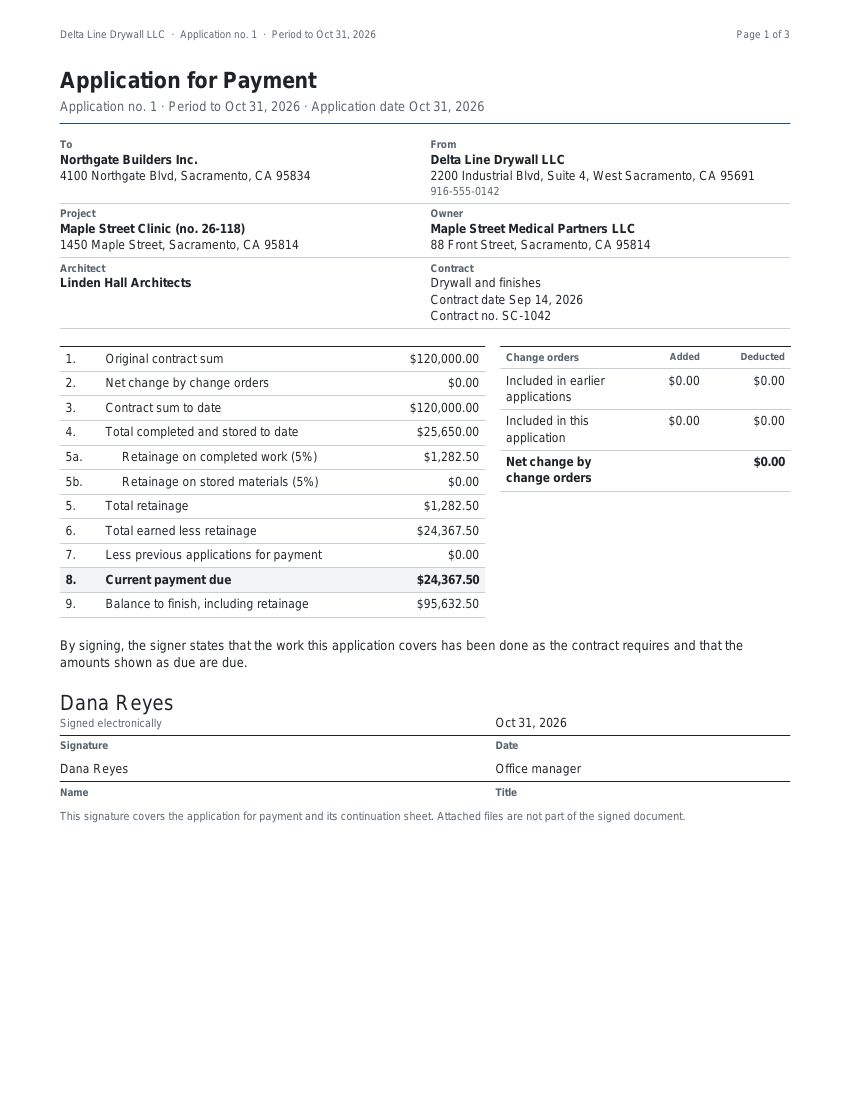
What goes in a pay app
The summary page carries the job’s running totals in nine numbered lines, from the original contract sum down to the balance to finish. The continuation sheet carries the detail behind them: each line of the schedule of values (SOV) with its scheduled value, the work billed on earlier pay apps, the work this period, materials stored on site, the total to date, the percent complete, the balance to finish and the retainage on that line. The continuation sheet’s totals are the summary page’s figures, so the two parts can never disagree.
Around those two pages sit the things a GC asks for in the subcontract: a lien waiver for the payment, invoices for stored materials, sometimes photos or a certified payroll. Most contracts set a monthly period with a cut-off date, often the 25th, and a pay app that arrives after the cut-off usually waits for the next cycle.
A worked example: the second pay app on a drywall job
A drywall sub has a $120,000 contract with 10% retainage and no change orders yet. Its first pay app billed $25,650: mobilization in full, 40% of framing and 10% of hanging. In February it frames most of the rest, hangs more board and starts taping. This is the continuation sheet for the period to February 28, 2026.
| Line | Scheduled value | From earlier apps | This period | Total to date | % | Balance to finish | Retainage |
|---|---|---|---|---|---|---|---|
| 1 Mobilization | 5,000.00 | 5,000.00 | 0.00 | 5,000.00 | 100 | 0.00 | 500.00 |
| 2 Framing | 42,000.00 | 16,800.00 | 21,000.00 | 37,800.00 | 90 | 4,200.00 | 3,780.00 |
| 3 Hanging | 38,500.00 | 3,850.00 | 23,100.00 | 26,950.00 | 70 | 11,550.00 | 2,695.00 |
| 4 Taping and finishing | 31,250.00 | 0.00 | 6,250.00 | 6,250.00 | 20 | 25,000.00 | 625.00 |
| 5 Punch list | 3,250.00 | 0.00 | 0.00 | 0.00 | 0 | 3,250.00 | 0.00 |
| Totals | 120,000.00 | 25,650.00 | 50,350.00 | 76,000.00 | 44,000.00 | 7,600.00 |
Read across any row and it adds up: earlier work plus this period gives the total to date, and the scheduled value less the total to date gives the balance to finish. Read down and the totals become the summary page.
| 1Original contract sum | $120,000.00 |
| 2Net change by change orders | $0.00 |
| 3Contract sum to date | $120,000.00 |
| 4Total completed and stored to date | $76,000.00 |
| 5Retainage, 10% of completed work | $7,600.00 |
| 6Total earned less retainage | $68,400.00 |
| 7Less previous applications | $23,085.00 |
| 8Current payment due | $45,315.00 |
| 9Balance to finish, including retainage | $51,600.00 |
Two figures are worth a second look. Line 7 is not the $25,650 of work billed last month: it is what the first pay app asked to be paid, $23,085, after retainage. And line 9 is not the contract sum less the payment: it is the contract sum less the total earned after retainage, so the $7,600 still held counts as unfinished money. A GC checking this pay app ties line 4 to the continuation sheet, line 7 to last month’s line 8 plus any earlier ones, and line 3 to the SOV total. If all three agree, line 8 is the check.
The terms, and the arithmetic behind each
| Term | What it is | How it is worked out |
|---|---|---|
| Contract sum to date | The contract as it stands now | The original contract sum plus added change orders, less deducted ones |
| Work this period | What was installed since the last cut-off | Typed in dollars, or a percent of the line’s value turned into dollars |
| Materials stored | Delivered to site, not yet installed | Stored last time, plus new deliveries, less what went in this period |
| Total completed and stored | Everything earned so far on a line | Earlier work, plus this period, plus materials still stored |
| Percent complete | How far along the line is | The total to date divided by the scheduled value |
| Retainage | The share held back until the end | The rate times each line’s work, rounded on the line, then added |
| Total earned less retainage | What the sub has earned in cash so far | The total completed and stored, less the retainage held |
| Current payment due | The amount asked for now | The total earned less retainage, less what earlier pay apps asked for |
| Balance to finish | What is left to bill on the contract | The contract sum to date, less the total earned less retainage |
Retainage has a guide of its own: rates that differ on work and on stored materials, rate changes partway through a job, and the release at the end. See retainage on a pay app.
Why pay apps get kicked back, and what the app checks
A pay app that comes back costs a month: it is fixed, sent again and paid in the next cycle. The reasons are nearly always arithmetic or paperwork, and most of them can be caught before the pay app leaves the office. This is what the app’s billing engine does with each one.
| Reason it comes back | What the app does |
|---|---|
| The SOV does not tie out to the contract sum | Stops the pay app from being finished until the SOV total equals the contract sum to date, and shows the difference |
| Earlier work copied in wrong | Carries earlier work and earlier payments forward from the last finished pay app, so nothing is retyped |
| A line billed past its value | Warns and names the line, and still lets it go out, since a change order may be on the way |
| Retainage that does not match the rows | Rounds retainage on each line and adds the lines, so the summary always equals the rows |
| More stored material installed than was stored | Stops the pay app and names the line |
| A correction that takes a line below zero | Stops the pay app: work to date with the wrong sign for its line |
| A retainage release above what is held | Stops the pay app and shows the amount held |
| A payment due below zero | Warns that the pay app would return money to the GC |
| No lien waiver or backup | Not a check: the waiver is made from the same pay app and the backup files go into the same PDF |
The engine is tested against twelve worked jobs, each figured by hand to the cent, including change orders, rate changes, corrections and releases.
Change orders on a pay app
A change order signed by both parties changes the contract, so it changes the pay app in two places. On the summary page, line 2 moves and line 3 with it, with additions and deductions shown apart. On the continuation sheet, the change order becomes its own line from the next pay app, with its own value, its own percent complete and its own retainage. A deducting change order is a line with a negative value, billed as a credit when the work is taken out. Keeping change orders on their own lines lets the GC match each one to its paper and keeps the original SOV lines untouched.
Materials stored on site
Board delivered in March and hung in April shows up on two pay apps, in two different places. In March it sits under materials stored on its line: it counts toward the total completed and stored, and retainage is held on it at the stored rate. In April, as it goes up, the amount moves out of stored and into work completed. The total to date on the line does not jump, because the money only changes place. Many GCs ask for the supplier’s invoice as backup for anything billed as stored, and some subcontracts do not pay for stored materials at all, so the subcontract is the first thing to read.
Our layout and AIA’s two forms
AIA sells a payment application and a continuation sheet for progress billing, and most GCs know the pair by AIA’s form numbers. AIA Contract Documents’ article AIA Billing Explained, read Nov 13, 2026, says the payment application carries the billing period, the contract value, the work completed to date and the amount requested, and the continuation sheet breaks the work down line by line. Our pay app has the same two parts in our own layout, and it is not an AIA document. The guide to the two AIA forms sets out what AIA says each holds and how ours lines up.
Making a pay app here
- Set up the schedule of values from the contract.
- Enter the work done this period on each line, as an amount or a percent.
- Add materials stored on site and not yet installed.
- Check retainage, earlier payments and the amount due now.
- Sign, add the lien waiver and backup, and send one PDF.
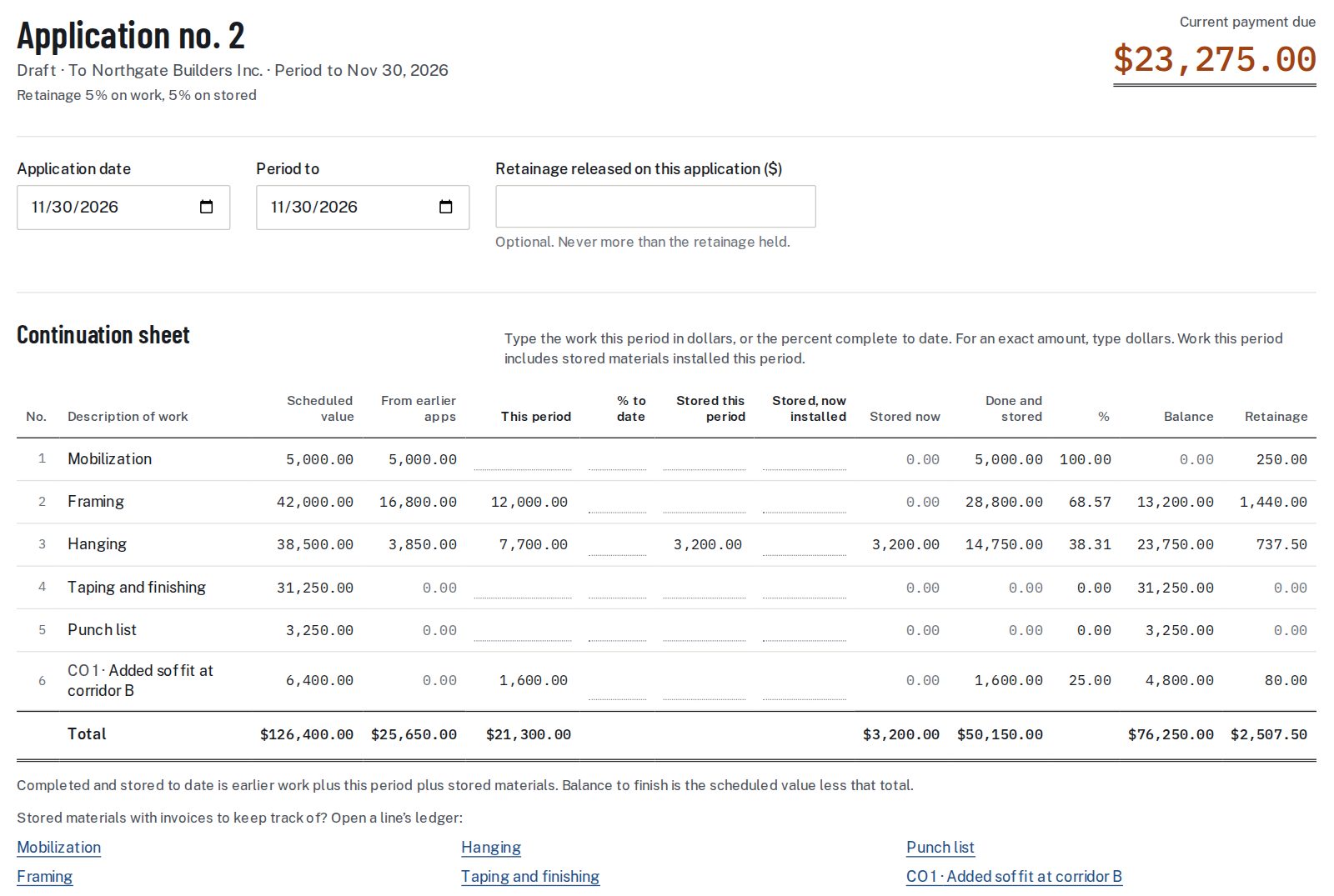
The first pay app on a job takes the longest, because the SOV goes in once. Each later one starts from the last: the earlier work is filled in, so a month’s billing comes down to typing what was done on each line.
The lien waiver that goes with it
Most GCs pay against a lien waiver, and the waiver’s amount is this pay app’s line 8. In the app the waiver is made from the finished pay app, so the amount, the period end date and the names match without retyping. Where the job’s State prints its own wording, that wording is used; the lien waiver guide explains the four kinds, and the conditional progress waiver is the one usually sent with a pay app before payment.
Pay application questions
Who sends a pay application?
The party doing the work sends it to the party paying: a sub to the GC, a GC to the owner.
How often is a pay app sent?
Most contracts set a monthly billing period with a cut-off date. The contract decides.
How is a pay app different from an invoice?
An invoice asks for an amount. A pay app shows how the amount was reached: each line’s value, the work to date, the retainage held and what was paid before, so the GC can check it line by line.
What backup goes with a pay app?
Whatever the contract or the GC asks for, often a lien waiver, invoices for stored materials and photos. The app attaches the files and puts them in the same PDF.
Can I bill a line by percent instead of dollars?
Yes. Type the percent complete and the app turns it into dollars on that line, rounded to the cent, and shows both.
What if last month’s pay app billed too much on a line?
Enter a negative amount for this period on that line. The work to date drops, retainage drops with it, and the correction is plain to the GC.
Is this an AIA document?
No. It is a G702/G703-style pay app in our own layout, with the fields GCs look for, and every page says so in its footer.
Sources: FAR 52.232-5, Payments under Fixed-Price Construction Contracts.
Related guides
For the method behind this kind of billing, read AIA billing in plain terms. For the arithmetic of what is held back, see retainage; for building the lines, see schedule of values.
Two related pages: the change order form, for what moves the contract sum on line 2, and the pay app template, a spreadsheet with the same arithmetic.