 Simple Pay Application

Pay application software for subcontractors
Type this period's work on each line. The app carries the earlier pay apps forward, holds retainage line by line and prints a G702/G703-style pay app with its lien waiver, ready to submit.
- Totals tie out to the contract sum to the cent
- State waiver wording printed word for word in 12 States
- One project for 30 days at $5.99, or $27.99 a month on Solo
Pay app no. 2
Period to Nov 30, 2026
Maple Street Clinic · Sacramento, CA
To Northgate Builders Inc.
- 3Contract sum to date
- 126,400.00
- 4Completed and stored to date
- 50,150.00
- 5Retainage, 5%
- 2,507.50
- 6Earned less retainage
- 47,642.50
- 7Less previous pay apps
- 24,367.50
- 8Current payment due
- $23,275.00
Continuation sheet, 6 lines · Conditional progress waiver, Civil Code 8132
From schedule of values to a signed pay app
-
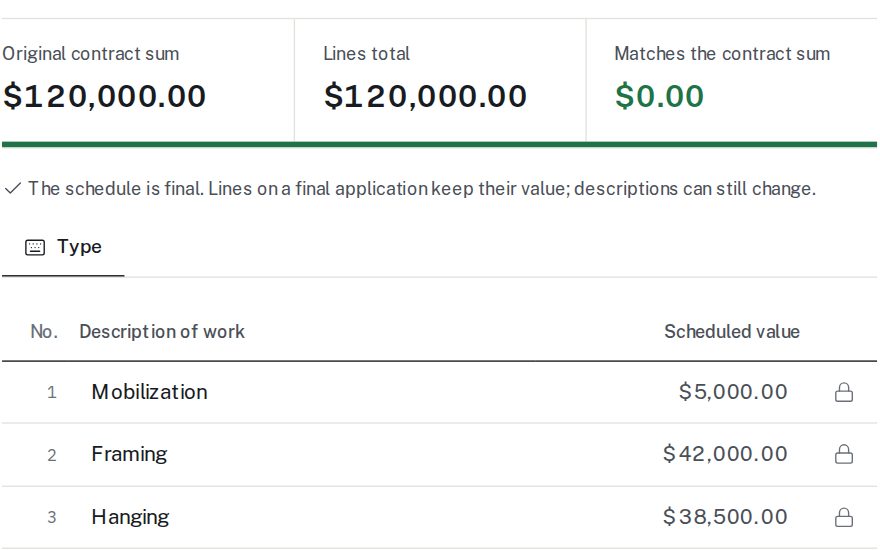
1Paste the schedule of values
Copy the lines from Excel or upload a CSV file. The app shows the difference from the contract sum until the lines tie out, then locks the values that are already billed.
-
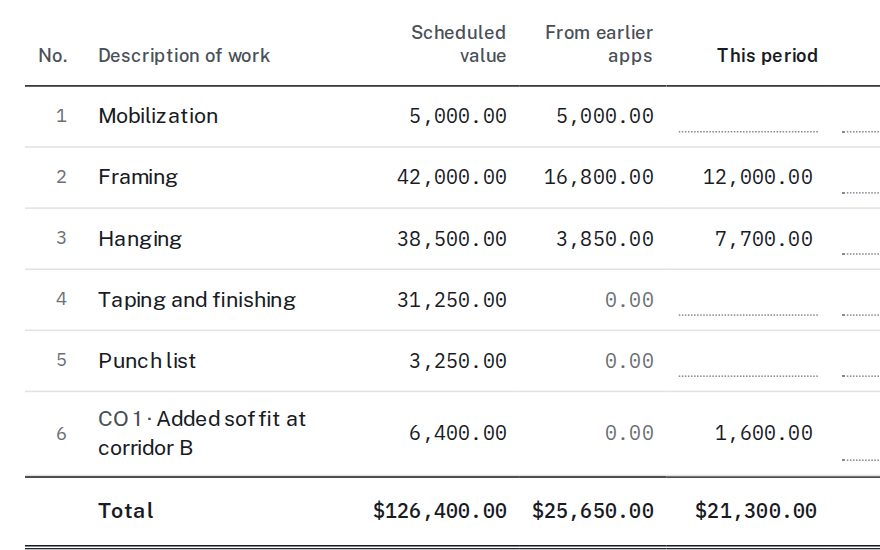
2Bill the period
Enter work by dollars or by percent, add stored materials and change orders. Earlier work, retainage, the amount due and the balance to finish update as you type.
-
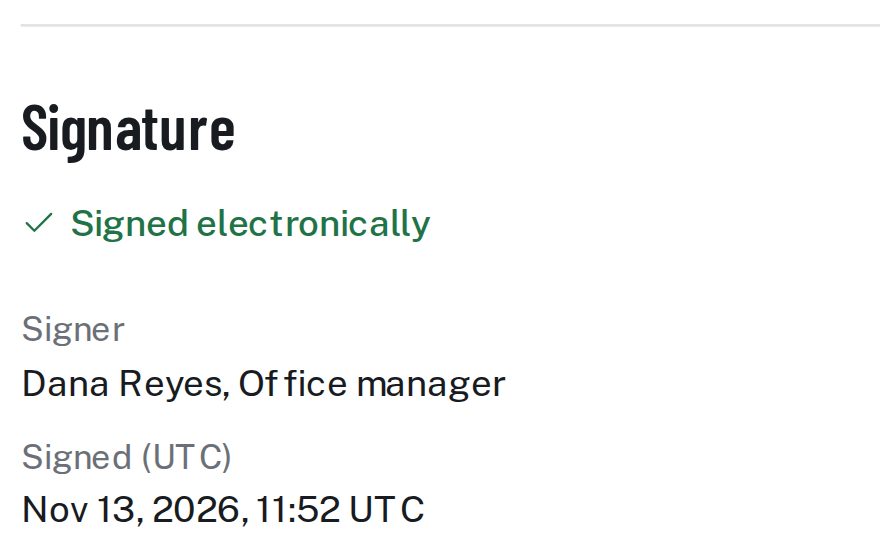
3Sign and send one PDF
Make the lien waiver from the same pay app, sign typed or drawn, and attach backup. The summary page, continuation sheet, waiver and invoices go out as one file.
What a pay app here includes
Pay application
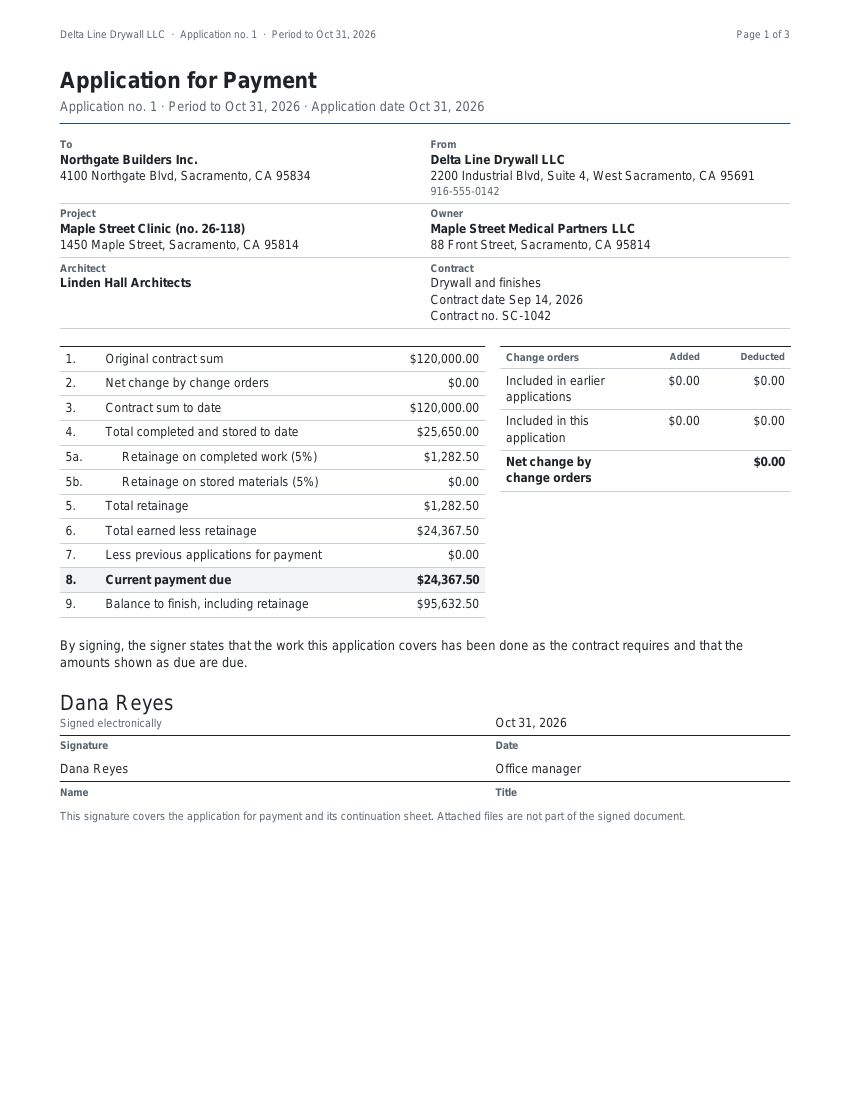
A summary page with lines 1 to 9: contract sum, change orders, work to date, retainage, earlier payments and the current payment due. Your logo sits at the top.
Continuation sheet
One row per line of the schedule of values, with this period, materials stored, percent complete and balance to finish. Its totals are the summary's totals.
Change orders
An added or deducted change order becomes its own line from the next pay app. The summary shows additions and deductions apart.
Retainage
One rate on work, another on stored materials, rounded on each line. A rate change applies to later work and never touches retainage already held.
Stored materials
Materials delivered and not yet installed are billed as stored. When they go in, they move into work completed, and the ledger shows where each dollar went.
Lien waivers
Conditional or unconditional, progress or final. Twelve States print their own wording, and the app uses it there; other States get our general form.
A sample you can check by hand
A drywall sub has a $120,000 contract with 5% retainage. On its first pay app it bills mobilization in full, 40% of framing and 10% of hanging: $25,650 of work.
| 4Total completed and stored to date | $25,650.00 |
| 5Retainage at 5% | $1,282.50 |
| 6Total earned less retainage | $24,367.50 |
| 7Less previous applications | $0.00 |
| 8Current payment due | $24,367.50 |
| 9Balance to finish, including retainage | $95,632.50 |
The figures come from the same engine that builds every pay app, tested against twelve worked jobs to the cent. The pay application guide walks through a second month on the same schedule of values.

Built for the office behind the crew
The person who sends the pay app on the 25th, chases the waiver and answers the PM's questions about line 4.
Plans and prices
Solo
$27.99 a month
15 active projects, 1 user
Crew
$55 a month
50 active projects, 5 users
Company
$89 a month
200 active projects, 15 users
Contractor Pro
$175 a month
Unlimited active projects, 30 users
Single pay app
$5.99 once
One project for 30 days
About 30% under PayAppHub and PayAppPro
| Their plan | Their price | Simple Pay Application |
|---|---|---|
| PayAppHub Solo | $39.99 a month | Solo, $27.99 a month |
| PayAppHub Standard | $79.99 a month | Crew, $55 a month |
| PayAppHub Premium | $129.99 a month | Company, $89 a month |
| PayAppPro SMB | $79 a month | Crew, $55 a month |
| PayAppPro TEAM | $129 a month | Crew, $55 a month |
| PayAppPro PRO | $249 a month | Company, $89 a month |
Prices from PayAppHub’s and PayAppPro’s own pages, read Nov 13, 2026. Yearly plans here cost ten months. Full details on the pricing page.
What you can count on
- State forms word for word Each State form is copied from the statute, read a second time, and printed with its section number and the date it was read.
- Math checked to the cent Retainage is rounded per line and added, so the continuation sheet always adds up to the summary page.
- What the PDF shows is what the screen shows A finished pay app is frozen; a revision makes a new version and keeps the old one.
- Our own layout The pay app is G702/G703-style, not an AIA document.
Lien waiver forms by State
These States print waiver wording in their statutes. Each page shows the forms, the section and the date we read it; the lien waiver guide explains the four kinds.
Questions subs ask
What is a G702/G703-style pay app?
A pay application with the same two parts GCs know: a summary page with the contract figures and the amount due, and a continuation sheet with one row per schedule of values line. Ours is our own layout, not an AIA document.
Can I paste my schedule of values from Excel?
Yes. Copy the rows straight from Excel, or upload a CSV file. The app reads the line numbers, descriptions and values, and shows how far the total is from the contract sum.
Which lien waiver does the app use for my job?
The one for the project’s State. Twelve States print the wording in their statutes, and the app uses it word for word there. In other States it offers our general forms, in the same four kinds.
Can my office manager and PM both work on a pay app?
Yes, on Crew and the plans above it. Users per plan: one on Solo, five on Crew, fifteen on Company and thirty on Contractor Pro. Each person signs in with their own e-mail.
What happens to my pay apps if I stop paying?
The account turns read-only. Every pay app, waiver and PDF stays readable and downloadable for six months after the last plan or single pay app ends; you only need a plan again to make changes. After six months the account is deleted, and we email the account owner 30 days before with a link to download everything.
Is the signature on the PDF a real signature?
It is a typed or drawn electronic signature with the signer’s name and the time recorded on the record page. Where a State form has a notary block, it is printed for a notary to complete.