 Simple Pay Application
Schedule of values (SOV) for construction billing
A schedule of values (SOV) splits the contract sum into billing lines, each with a dollar value. The lines add up to the contract sum to the cent, and when they do the SOV ties out and every pay app built on it starts from the right base.
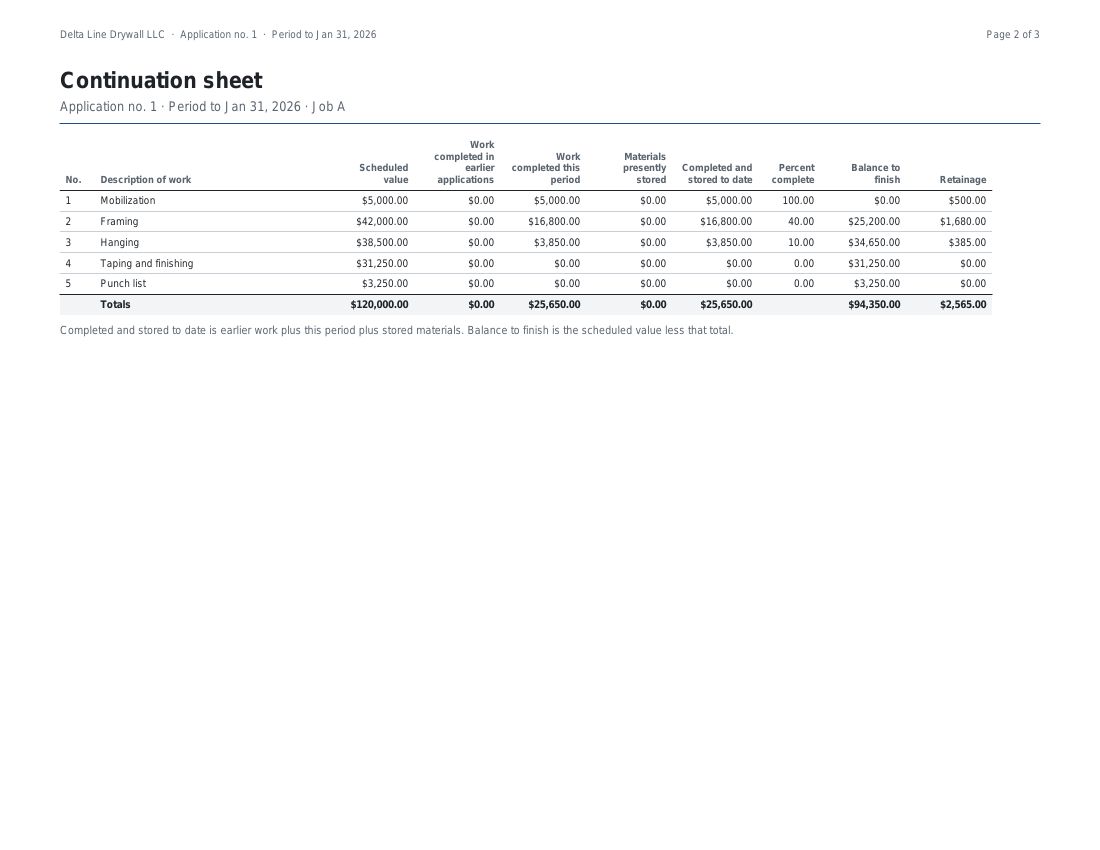
The SOV is set before the first pay app, and each line is then billed on the continuation sheet. This guide shows a full SOV for an electrical job, how it ties out, what a change order does to it, and a painting job where the retainage lands a cent away from the rate times the total.
How the contract is split into lines
The lines follow the way the work is checked on site: a floor or an area, a phase, or an item such as framing, board or tape. A line is a number, a description and a scheduled value. A small job may have five lines and a large one fifty, and the GC reads each line against what it sees on a walk-through. An item that will be billed as stored materials gets a line of its own, so the stored dollars have a place to sit until the item is installed.
A full SOV for one trade: electrical
An electrical sub signs a $200,000 contract. The SOV splits it into four lines, one for each stage of the work.
| Line | Description | Scheduled value | Share of the contract |
|---|---|---|---|
| 1 | Rough-in labor | 60,000.00 | 30.00% |
| 2 | Switchgear | 85,000.00 | 42.50% |
| 3 | Fixtures | 40,000.00 | 20.00% |
| 4 | Trim-out | 15,000.00 | 7.50% |
| Lines total | 200,000.00 | 100.00% |
Add the values: $60,000.00, $85,000.00, $40,000.00 and $15,000.00 come to $200,000.00. That equals the contract sum, so the difference is $0.00 and the SOV ties out. In the same job the switchgear is billed as stored materials while it waits on site, and a line of its own shows that plainly.
Suppose the trim-out line had been typed as $14,500.00. The lines would total $199,500.00 and the app would show the schedule $500.00 short of the contract sum. The project cannot be started while the lines are off, and a pay app cannot be finished until the SOV total equals the contract sum to date.
What a change order does to the SOV
A concrete sub starts with a $160,000 contract. A change order signed by both parties adds a thickened slab at the loading dock for $12,500.00, and later another deletes an east curb for a $4,000.00 credit. Each becomes a line of its own from the next pay app. The original lines are left as they were, and the contract sum to date moves with the change orders.
| Line | Description | Scheduled value | Contract sum to date |
|---|---|---|---|
| 1 | Footings | 48,000.00 | |
| 2 | Slab on grade | 96,000.00 | |
| 3 | Curbs | 16,000.00 | 160,000.00 |
| 4 | CO 1: Thickened slab at loading dock | 12,500.00 | 172,500.00 |
| 5 | CO 2: Delete east curb (credit) | -4,000.00 | 168,500.00 |
| Lines total | 168,500.00 | 168,500.00 |
The tie-out moves with them. The additions and deductions are shown apart on the summary page, net $8,500.00 here, and the lines total still equals the contract sum to date, $168,500.00.
A worked example: a painting job to the cent
A painting sub has an awkward contract sum, $23,456.78, split into four lines that add to it exactly. The first pay app, for the period to January 31, 2026, bills $3,333.33 of prep, $2,222.25 of priming and $1,234.55 of finish coats, at 10% retainage.
| Line | Scheduled value | This period | % | Balance to finish | Retainage |
|---|---|---|---|---|---|
| 1 Prep | 3,333.33 | 3,333.33 | 100.00 | 0.00 | 333.33 |
| 2 Prime | 6,666.67 | 2,222.25 | 33.33 | 4,444.42 | 222.23 |
| 3 Finish coats | 12,345.67 | 1,234.55 | 10.00 | 11,111.12 | 123.46 |
| 4 Touch-up | 1,111.11 | 0.00 | 0.00 | 1,111.11 | 0.00 |
| Totals | 23,456.78 | 6,790.13 | 16,666.65 | 679.02 |
The retainage column is where a cent can slip. Priming holds $222.225 and finish coats $123.455, and each is rounded to the cent on its own line, to $222.23 and $123.46. Prep rounds down from $333.333 to $333.33. The three lines add to $679.02. Work out 10% of the $6,790.13 total in one step and the answer is $679.01. The GC adds the column down the page, so the summary page carries the $679.02 the rows give.
| 1Original contract sum | $23,456.78 |
| 2Net change by change orders | $0.00 |
| 3Contract sum to date | $23,456.78 |
| 4Total completed and stored to date | $6,790.13 |
| 5Retainage held | $679.02 |
| 6Total earned less retainage | $6,111.11 |
| 7Less previous applications | $0.00 |
| 8Current payment due | $6,111.11 |
| 9Balance to finish, including retainage | $17,345.67 |
Line 9 is the contract sum less what has been earned after retainage: $23,456.78 less $6,111.11. The $16,666.65 of work still to bill and the $679.02 held make up the same $17,345.67. This is the first pay app, so line 7 is zero.
The terms, and the arithmetic behind each
| Term | What it is | How it is worked out |
|---|---|---|
| Line number | The place of the line in the schedule | Original lines first; change order lines follow |
| Description | The work the line stands for | Typed, pasted or uploaded; it can still be changed once the line is billed |
| Scheduled value | The part of the contract given to the line | A dollar amount; on a change order line, the amount of the change; fixed once the line is on a finished pay app |
| Lines total | The SOV added up | Every scheduled value added, change order lines included |
| Original contract sum | The contract as signed | Entered on the project, before any change order |
| Contract sum to date | The contract as it stands | The original sum plus change order additions, less deductions |
| Difference | How far the lines are from the contract | The contract sum less the lines total; zero when the SOV ties out |
Why a schedule of values gets a pay app kicked back
A pay app is built on the SOV, so an error in the SOV repeats in every pay app after it. These are the usual causes, and what the app does about each.
| What the GC finds | What the app does |
|---|---|
| Lines that do not add up to the contract sum | Shows the difference and blocks finishing until the SOV total equals the contract sum to date |
| A line value that differs from the last pay app | Keeps the value of a line fixed once it is on a finished pay app |
| A change order folded into an original line | Gives each change order signed by both parties its own line from the next pay app; a deduction is a negative line |
| Earlier work retyped from last month | Carries earlier work and earlier payments forward from the last finished pay app |
| A line billed past its value | Warns and names the line, and still lets the pay app go out |
| Retainage a cent off the rows | Rounds each line, then adds the lines, so the summary equals the rows |
The engine is tested against twelve worked jobs, each figured to the cent.
Setting up the SOV here
- Enter the original contract sum when you set up the project.
- Add the lines: type them, paste them from Excel, or upload a CSV file with a description and an amount, or an item number, a description and an amount.
- Read the lines total and the difference from the contract sum, and change lines until the difference is $0.00.
- Start the project and make the first pay app from these lines.
- When a change order is signed by both parties, add it; it becomes its own line from the next pay app.
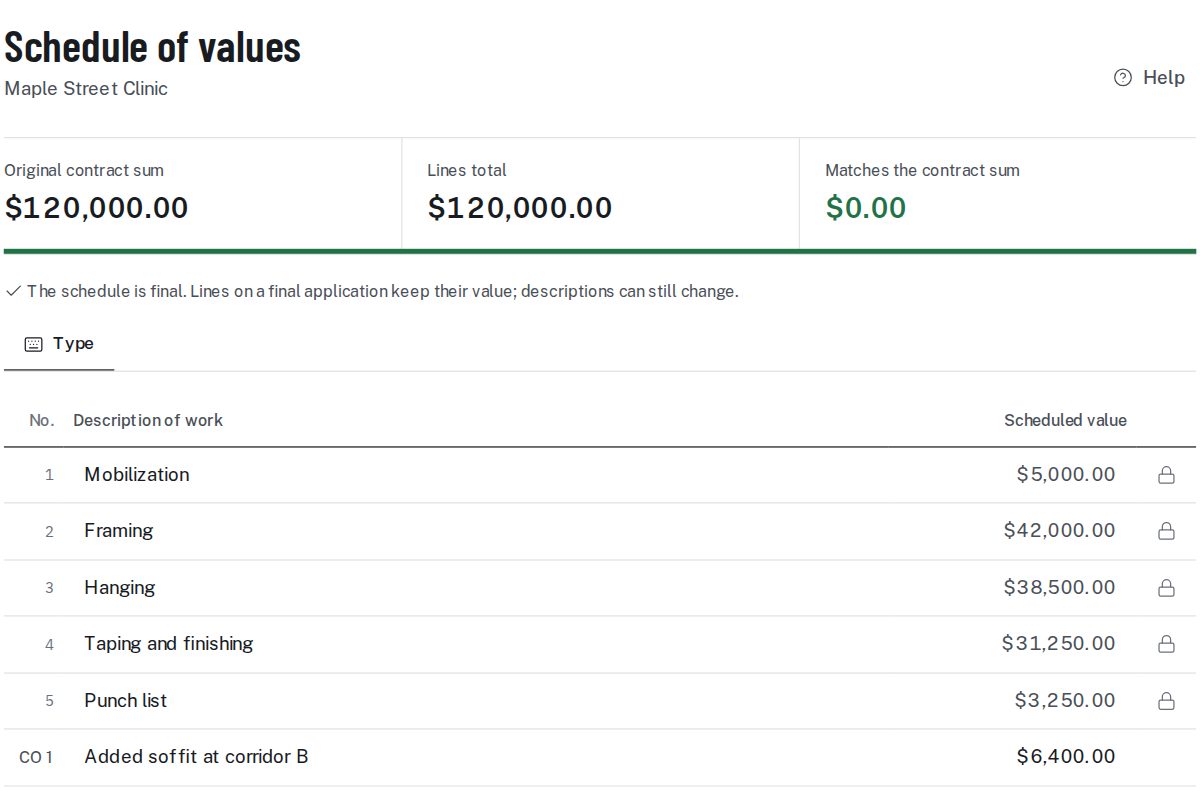
A SOV kept in Excel is copied in once and not typed again. From then on each pay application and its continuation sheet start from these lines.
Schedule of values questions
How many lines does a schedule of values have?
As many as the work needs: a handful on a small job, dozens on a large one. Each line stands for something a GC can check on site.
Can I paste my SOV from Excel?
Yes. Copy the rows from Excel and paste them, or save the sheet as a CSV file and upload it. The app reads the descriptions and values and shows the total next to the contract sum.
What if the lines do not add up to the contract sum?
The app shows the difference. The project cannot be started while the lines are off, and a pay app cannot be finished until the SOV total equals the contract sum to date.
Can I change a line after it is billed?
The description can still be changed. Once a line is on a finished pay app its scheduled value stays as it was.
How does a change order appear in the SOV?
A change order signed by both parties becomes its own line from the next pay app. An addition is a positive line, a deduction a negative one, and the contract sum to date moves with them.
Where do stored materials go in the SOV?
On the line of the item that is stored. The stored dollars sit on that line under materials presently stored until the item is installed, then move into the work.
Is the schedule of values the same as the continuation sheet?
No. The schedule of values lists the lines and their values. The continuation sheet starts from those lines and adds the billing for one period.
Sources: FAR 52.232-5, Payments under Fixed-Price Construction Contracts.
Related guides
Retainage on each line is covered in the retainage guide, and the method behind billing by line is explained in AIA billing in plain terms.
Worked SOVs for seven trades are on the schedule of values examples page, the columns to set up are on the schedule of values template page, and the pay app template is a spreadsheet to download. A change to the contract adds lines through a change order form signed by both parties.