 Simple Pay Application
A pay app template in Excel, with the arithmetic done
The pay app template on this page is a free Excel workbook: a summary page and a continuation sheet, with every total, percent, balance and retainage figure worked out by a formula. It comes filled in with a drywall job so the numbers can be read before they are replaced. Download pay-app-template.xlsx. There is no sign-up and no email to give.
The rest of this page says what is in the file, how each column is figured, how to roll it forward each month, and which checks a spreadsheet leaves to the person typing. It is a G702/G703-style layout in plain column names.
What is in the workbook
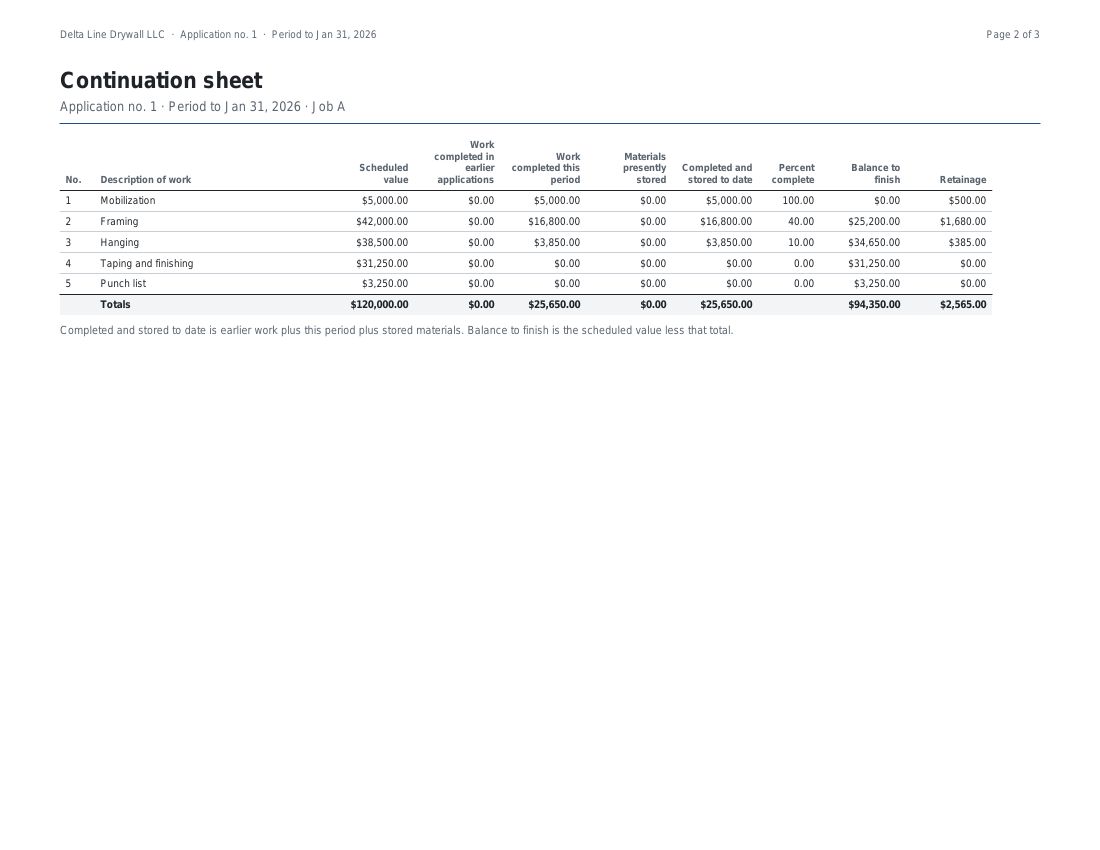
The file is a standard .xlsx workbook with two sheets and nothing hidden. The Summary sheet is first. Its top block holds four typed-in cells: the original contract sum, the net of change orders, the retainage rate and the previous applications. Below them sit the nine numbered lines of a pay app summary, each one a formula. The Continuation sheet is second. It has one row per line of the schedule of values, a totals row, and a header row that stays in view when the sheet is scrolled.
Typed-in cells have a yellow fill and blue type. Every other cell is a formula. The workbook also stores the answer each formula gave when it was made, so a viewer that does not recalculate, such as a phone preview, still shows numbers. A program that does recalculate will recompute them on opening and arrive at the same figures.
The continuation sheet, column by column
| Column | Typed or formula | How it is worked out |
|---|---|---|
| No. and Description | Typed | The line number and name from the schedule of values |
| Scheduled value | Typed | What the line is worth in the contract |
| Work from earlier applications | Typed | Work already billed on past pay apps |
| Work this period | Typed | Work billed now, including stored materials that went into the wall this month |
| Materials presently stored | Typed | Delivered, billed and not yet installed |
| Total completed and stored to date | Formula | Earlier work plus this period plus materials presently stored |
| Percent complete | Formula | The total completed and stored divided by the scheduled value, shown as a percent |
| Balance to finish | Formula | The scheduled value less the total completed and stored |
| Retainage | Formula | The total completed and stored times the retainage rate, rounded to the cent on that line |
The totals row adds each money column down the lines, and divides its own total completed by its own scheduled value for the percent. The Summary sheet reads two cells from that row, the total completed and stored and the retainage, and nothing else on the Continuation sheet. For the longer story of each column, see the continuation sheet guide.
The arithmetic in words
Each line is billed in three buckets: work from before, work now and materials sitting in storage. They are added to give what the line has earned to date. That figure, set against the scheduled value, gives the percent complete and the balance to finish. The retainage cell takes the same figure and multiplies it by the rate in the Summary sheet, then rounds to the cent before anything is added up.
Rounding on each line is the detail that keeps the two pages together. The retainage on the summary is the sum of the line figures, not the rate applied once to the grand total, so a GC adding the column by hand arrives at the same number. The retainage guide shows a job where the two methods differ by a cent.
The Summary sheet then follows the usual order. Line 3 is the original contract sum plus net change orders. Line 4 and line 5 come from the totals row. Line 6 is line 4 less line 5. Line 7 is the typed previous applications figure. Line 8, the current payment due, is line 6 less line 7. Line 9, the balance to finish including retainage, is line 3 less line 6. One more cell, under the nine lines, shows the schedule of values total less the contract sum to date, which reads 0.00 when the two agree.
The sample job, filled in
The file opens on the second pay app of a drywall job: a $120,000 contract, 10% retainage, no change orders, and $23,085.00 asked for on the first pay app. Here is its Continuation sheet as it opens.
| Line | Scheduled value | From earlier apps | This period | Stored | Total to date | % | Balance to finish | Retainage |
|---|---|---|---|---|---|---|---|---|
| 1 Mobilization | 5,000.00 | 5,000.00 | 0.00 | 0.00 | 5,000.00 | 100.00 | 0.00 | 500.00 |
| 2 Framing | 42,000.00 | 16,800.00 | 21,000.00 | 0.00 | 37,800.00 | 90.00 | 4,200.00 | 3,780.00 |
| 3 Hanging | 38,500.00 | 3,850.00 | 23,100.00 | 0.00 | 26,950.00 | 70.00 | 11,550.00 | 2,695.00 |
| 4 Taping and finishing | 31,250.00 | 0.00 | 6,250.00 | 0.00 | 6,250.00 | 20.00 | 25,000.00 | 625.00 |
| 5 Punch list | 3,250.00 | 0.00 | 0.00 | 0.00 | 0.00 | 0.00 | 3,250.00 | 0.00 |
| Totals | 120,000.00 | 25,650.00 | 50,350.00 | 0.00 | 76,000.00 | 63.33 | 44,000.00 | 7,600.00 |
Hanging shows the pattern. It started the month with $3,850.00 billed, added $23,100.00, and so stands at $26,950.00 of a $38,500.00 line, 70 percent. Ten percent of that is $2,695.00 held. The Summary sheet turns the totals row into this:
| 1Original contract sum | $120,000.00 |
| 2Net change by change orders | $0.00 |
| 3Contract sum to date | $120,000.00 |
| 4Total completed and stored to date | $76,000.00 |
| 5Retainage held | $7,600.00 |
| 6Total earned less retainage | $68,400.00 |
| 7Less previous applications | $23,085.00 |
| 8Current payment due | $45,315.00 |
| 9Balance to finish, including retainage | $51,600.00 |
These are the figures the pay application guide reaches for the same job, and the ones our own engine produces for it. A test run against the file recomputes every formula and compares the result with that job to the cent.
Filling it in each month
- Save a copy of last month’s file under a new name, so the old pay app stays as it was sent.
- On the Summary sheet, change the pay app number and the period.
- On the Continuation sheet, add last month’s work this period to the work from earlier applications on each line, then clear the work this period cells.
- Type this month’s work on each line. Stored materials that were installed this month go in work this period, and the materials presently stored cell is reset to what is still on site.
- Put the previous applications cell on the Summary sheet at last month’s total earned less retainage. It equals the sum of every payment asked for before this one.
- Check that the cell under the nine lines reads 0.00, then print or save the two sheets as a PDF.
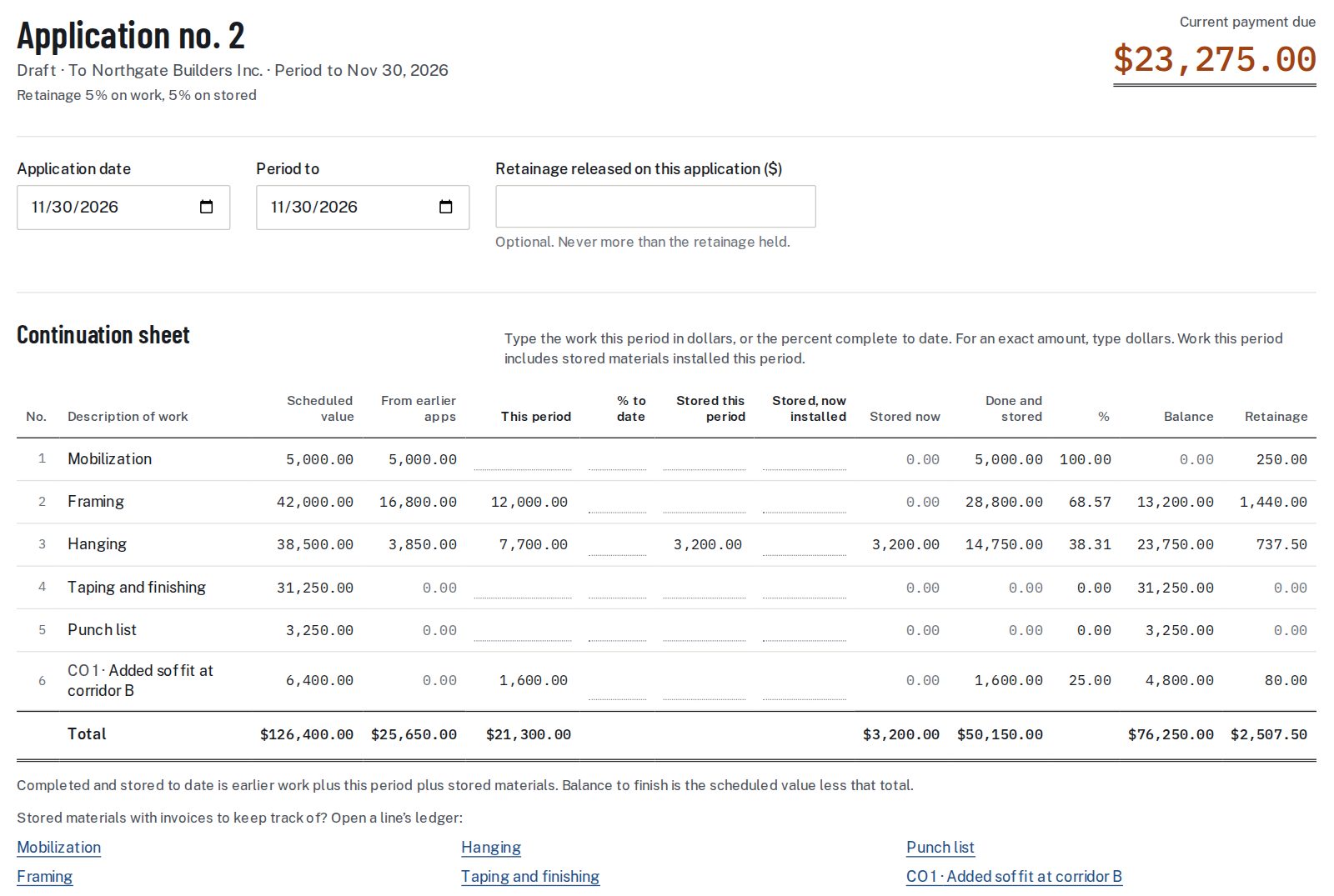
A change order signed by both parties adds a line. Insert a row between the first and last line so the totals pick it up, copy the formulas down from the row above, and enter the change in the net change orders cell. A deduction is a negative scheduled value. Setting up the lines in the first place is the part that takes the longest.
What a spreadsheet leaves to you
The workbook does the arithmetic and stops there. Everything else on the list below is a check that someone has to make by eye when the sheet is filled in by hand, and a check that the app makes while the pay app is being built.
| The check | In the workbook | In the app |
|---|---|---|
| Schedule of values adds to the contract sum | A cell shows the difference | Shows the difference and blocks finishing until the two are equal |
| Earlier work carried forward | Retyped or moved by hand each month | Carried from the last finished pay app |
| More installed than was stored | Nothing stops it | Blocked |
| A line billed over its value | The balance to finish turns negative | Warns and names the line |
| Two retainage rates | One rate for everything | One rate on work and one on stored materials |
| A rate change partway | Changing the rate cell reprices all earlier work too | Applies to later work only |
| Retainage release | Worked in by hand | Entered on the pay app and blocked above the amount held |
| Finished pay apps | Any cell can be overtyped | Frozen; a revision makes a new version |
| Lien waiver and backup | Made and attached separately | Made from the finished pay app and put in the same PDF |
A rate change and stored materials are the two places this shows most. Each alters the retainage on lines that were already billed, and a single rate cell cannot tell old work from new.
Getting the file
Download pay-app-template.xlsx, about 5 KB. It is free, and there is no account to make first. When billing moves from a spreadsheet to the app, the pricing page lists the options, starting with one project for 30 days.
Pay app template questions
Is the pay app template free?
Yes. The workbook is free to download from this page, with no sign-up and no email to give.
What program does it open in?
It is a standard .xlsx workbook, the format Excel saves. Other spreadsheet programs that read .xlsx files can open it as well.
Does it use macros or add-ins?
No. The workbook holds plain formulas only: cell references, addition, subtraction, multiplication, division, SUM and ROUND.
Can I add more lines than the sample has?
Yes. Insert a row between the first and last line so the totals row includes it, then copy the formulas down from the row above.
How is retainage figured in the workbook?
Each line multiplies its total completed and stored by the rate on the Summary sheet and rounds to the cent. The summary uses the sum of those lines.
What does the workbook not do?
It does not carry last month forward, block an entry, or hold two retainage rates. Those checks are listed in the table above, next to what the app does for each.
Does the sample match a real pay app?
It is a worked job from our test set, the second pay app on a $120,000 drywall contract. The totals tie to the figures in the pay application guide.
Sources: FAR 52.232-5, payments under construction contracts.
Related guides
For the page the workbook produces, read the pay application guide. For the detail behind the retainage column, see retainage, and for the lines themselves, the schedule of values.
The SOV that feeds the sheet can be set up from the schedule of values template.