 Simple Pay Application
Lien waiver form, filled from the pay app
A lien waiver form names the claimant, the customer, the project, the amount and the date the waiver runs through, then ends with a signature. Made from a pay app, most of those blanks are filled from figures already on the page, the payment due and the period end date, so the form and the pay app agree to the cent.
This guide goes through the blanks one at a time on the first pay app of a drywall job, and shows which of them change from one kind of waiver to the next. What each kind means, and which States print their own wording, is in the lien waiver guide.
The pay app the form is made from
Delta Line Drywall LLC, a drywall sub, has a $120,000 contract with Northgate Builders Inc. on the Maple Street Clinic job, with 5% retainage. Its first pay app bills mobilization in full, 40% of framing and 10% of hanging. Nothing has been billed before, so every figure on the continuation sheet is new work.
| Line | Scheduled value | This period | Total to date | % | Retainage |
|---|---|---|---|---|---|
| 1 Mobilization | 5,000.00 | 5,000.00 | 5,000.00 | 100 | 250.00 |
| 2 Framing | 42,000.00 | 16,800.00 | 16,800.00 | 40 | 840.00 |
| 3 Hanging | 38,500.00 | 3,850.00 | 3,850.00 | 10 | 192.50 |
| 4 Taping and finishing | 31,250.00 | 0.00 | 0.00 | 0 | 0.00 |
| 5 Punch list | 3,250.00 | 0.00 | 0.00 | 0 | 0.00 |
| Totals | 120,000.00 | 25,650.00 | 25,650.00 | 1,282.50 |
| 1Original contract sum | $120,000.00 |
| 2Net change by change orders | $0.00 |
| 3Contract sum to date | $120,000.00 |
| 4Total completed and stored to date | $25,650.00 |
| 5Retainage held | $1,282.50 |
| 6Total earned less retainage | $24,367.50 |
| 7Less previous applications | $0.00 |
| 8Current payment due | $24,367.50 |
| 9Balance to finish, including retainage | $95,632.50 |
The waiver is about line 8. The sub is asking to be paid $24,367.50, not the $25,650.00 of work billed, because the $1,282.50 of retainage stays with the GC for now. A waiver that named the work billed would not match the check.
The blanks of a general form, one at a time
States that print their own waiver wording use that wording word for word. In every other State the app offers a general form in our own words, in the four usual kinds. The conditional progress version has eleven blanks, and this is where each one comes from for the drywall job.
| Blank | What goes in it | Where the app takes it | In the sample |
|---|---|---|---|
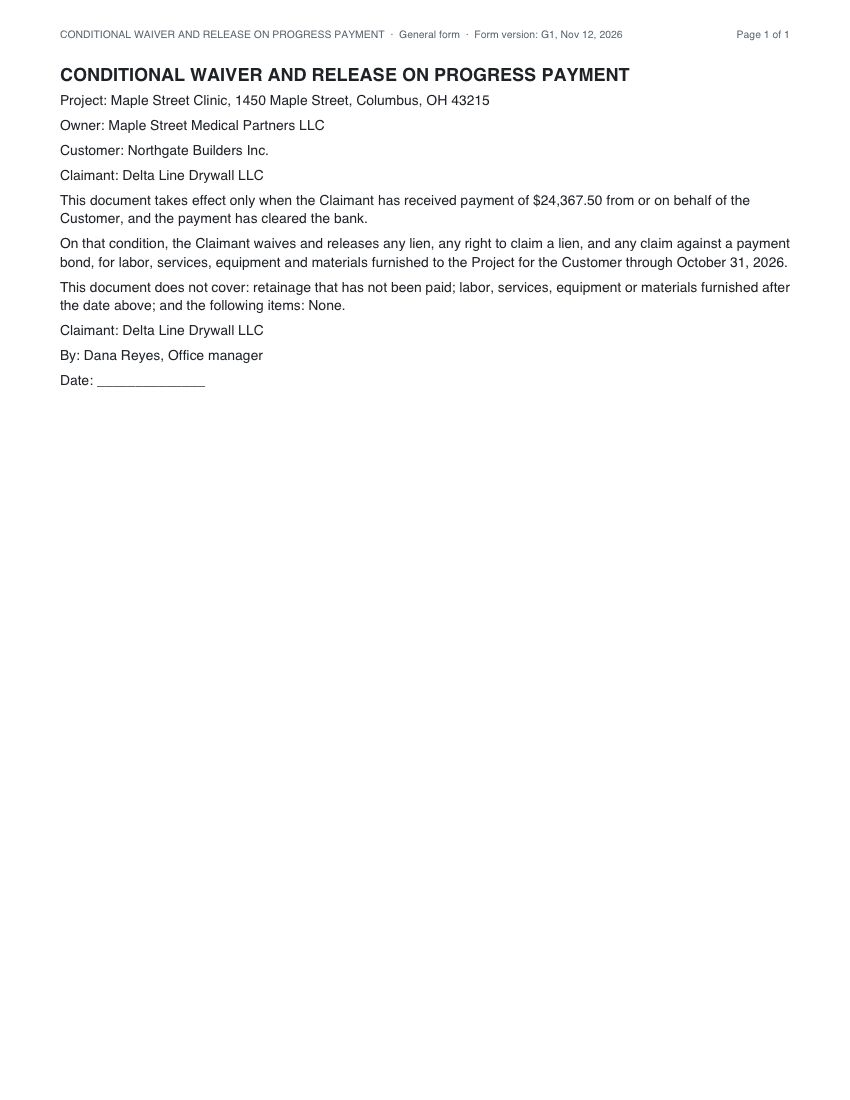
| Project name and address | The job the work was done on | The project record, typed once when the project is set up | Maple Street Clinic, 1450 Maple Street, Columbus, OH 43215 |
| Owner | The owner of the property | The owner’s name on the project record | Maple Street Medical Partners LLC |
| Customer | The party who pays the claimant | The name of the GC the pay app is billed to | Northgate Builders Inc. |
| Claimant | The company giving the waiver | The company name on the account | Delta Line Drywall LLC |
| Amount | The payment the waiver is for | Line 8 of the finished pay app, the current payment due | $24,367.50 |
| Through date | The date the waiver runs through | The period end date of the finished pay app | October 31, 2026 |
| Exceptions | Items the waiver does not cover | Typed on the waiver screen; the pay app has none | None |
| Signer’s name and title | The person who signs for the claimant | The signer saved on the account | Dana Reyes, Office manager |
| Date signed | The day the signature is recorded | Filled when the waiver is signed | A blank line until it is signed |
The claimant appears twice on the form, once at the top and once above the signature, and the app fills both from the one account name. The form’s own words are never edited by the fill. Only the blanks change: the app fills what it knows from the project and the pay app, you type the rest on the waiver screen, “None” or “0.00” where there is nothing to state, and only the signature and notary lines are left for hand.
Names: who is the customer and who is the owner
A sub’s waiver usually goes to the GC, and the GC passes its own waivers up to the owner. That is why the form has both names. The customer is whoever pays the claimant, which on a subcontract is the GC. The owner is the party whose property the lien would attach to. Writing the GC’s name in the owner blank, or the other way round, is an easy slip on a waiver, and the app heads it off by filling each blank from a separate field of the project.
What changes from one kind of waiver to the next
The four general forms share the party blanks. They differ in the amount and the date, because each kind says something different about the money. This is how the blanks are filled on the first pay app of the drywall job.
| Kind | Amount blank | Through date blank |
|---|---|---|
| Conditional progress | The payment due on this pay app: $24,367.50 | The period end date of this pay app |
| Unconditional progress | The payment due on the pay app before this one, which is the payment already received | The period end date of the pay app before this one |
| Conditional final | The payment due on this pay app, as the final payment | None on the form, which covers all the work |
| Unconditional final | None on the form, which says final payment was received in full | None on the form |
The unconditional progress row has a consequence on a first pay app. There is no earlier pay app to take a payment from, so the amount and the through date open as empty blanks. From the second pay app on they fill with the earlier payment and its date. Every blank on the screen can be edited before the waiver is saved, so a different figure is one keystroke away when a contract calls for it.
The same exercise on California’s form
California’s conditional progress form has other labels and a different order, and the app fills them in the same way. Name of Claimant:
takes the company name, Name of Customer:
the GC, Job Location:
the site address, and Through Date:
the period end date. The statute words the payment as a check, so the form asks for Maker of Check:
, Amount of Check: $
and Check Payable to:
. The app puts the GC in the first, the payment due in the second and the claimant in the third.
Two blanks under the form’s exceptions, the dates and amounts of earlier conditional waivers still unpaid, are on the fill screen too: type them, or “None” and “0.00” when there are none. The California page prints all four forms in full.
Terms on the pay app that feed the form
| Term | What it is | How it is worked out |
|---|---|---|
| Current payment due | The amount asked for on this pay app, and the waiver’s amount | The total earned less retainage, less what earlier pay apps asked for |
| Total earned less retainage | What the sub has earned in cash to date | The total completed and stored, less the retainage held |
| Retainage held | The share kept back until the end | The rate times each line’s work, rounded on the line, then added |
| Period end date | The last day of the billing period, and the through date | Typed on the pay app; the waiver copies it |
| Less previous applications | What the earlier pay apps asked for | The sum of line 8 on each earlier finished pay app |
Why a waiver gets sent back, and what the app does
| The problem | What the app does |
|---|---|
| An amount that does not match the pay app | Fills the amount from line 8 of the finished pay app, so the two agree unless someone edits the blank |
| A through date outside the billing period | Fills the date from the period end date on the pay app |
| The GC’s name in the owner blank | Fills customer and owner from two separate project fields, the same ones the pay app prints |
| A waiver made before the pay app is finished | Refuses, and says the pay app is still a draft |
| A form for the wrong State | Offers the forms for the project’s State: its statute’s forms where it has them, our general forms where it has none |
| A waiver edited after it was sent | Keeps a saved waiver as it is; until it is signed it can be deleted and made again |
| A waiver and backup sent apart | Puts the pay app, the waiver and the backup files into one PDF |
Signing, and what is recorded
The waiver can be signed typed or drawn, or sent as a signing link to the person who signs. Signing records the signer’s name and title, the time in UTC, the IP address and a fingerprint of the form, its fields and the parties. The waiver page then shows the record and whether the fingerprint still matches the stored waiver. Where a State’s form has a notary block, the PDF prints one; notarizing is done by a notary, outside the app.
Making the form here
- Finish the pay app the payment is for, so its figures are frozen.
- Open the project’s lien waivers and pick the kind: conditional or unconditional, progress or final.
- Check the blanks the app filled: amount, through date, names and signer. Type any exceptions.
- Save the waiver, then sign it typed or drawn, or send a signing link to the person who signs.
- Download the PDF; it carries the pay app, the waiver and the backup files together.
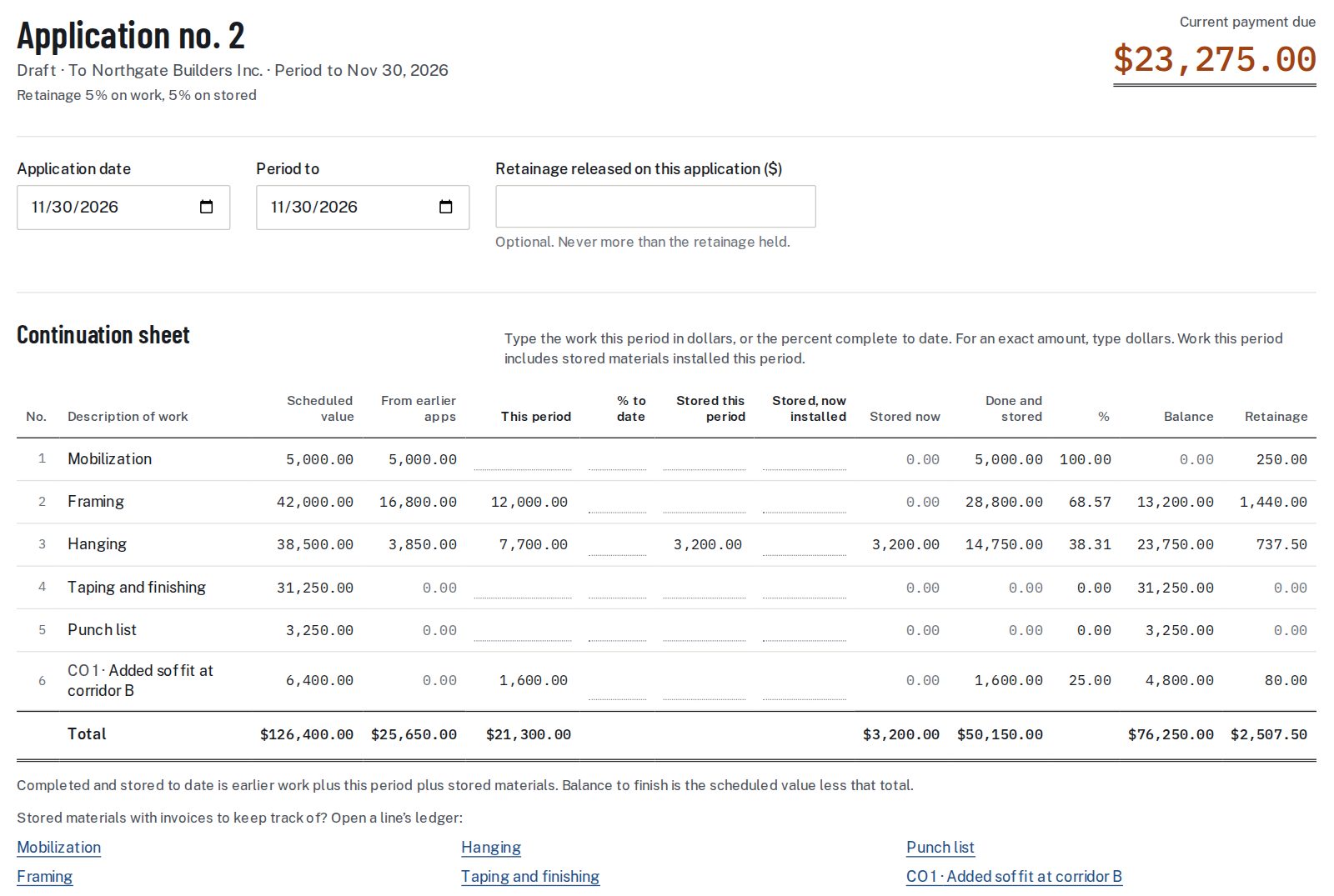
The pay app comes first because the waiver reads its figures. A draft pay app has no frozen total yet, so the waiver is made from the finished one.
Lien waiver form questions
Which blanks does the app fill on a lien waiver form?
Project name and address, owner, customer, claimant, amount, through date and the signer’s name and title. The amount and the through date come from the finished pay app; the rest come from the project and the account.
Can I change a blank the app filled?
Yes. Every blank on the waiver screen can be edited before the waiver is saved. After it is saved the waiver does not change, and until it is signed it can be deleted and made again.
Why are the amount and date empty on my unconditional progress waiver?
That form takes the payment already received, which is the payment due on the pay app before this one. On the first pay app of a job there is no earlier pay app, so both blanks open empty.
What goes in the exceptions blank?
The items the signer lists as not covered, such as disputed or unbilled work. The general progress forms already leave out unpaid retainage and later work. With nothing to list, the waiver says “None”: the app leaves no blank open except the signature and notary lines.
Does the form need a notary?
Where a State’s form has a notary block, the PDF prints one. The app records a typed or drawn signature; notarizing is done by a notary, outside the app.
Which form does the app offer for my project?
The one for the project’s State. Twelve States print their wording in a statute, and the app uses it word for word there. Other States get our general forms in the same four kinds.
What does the app record when a waiver is signed?
The signer’s name and title, the time in UTC, the IP address and a fingerprint of the form, its fields and the parties. The waiver page shows whether the fingerprint still matches.
Do the waiver and the pay app go out as one file?
Yes. The pay app, the waiver and any backup files are put into the same PDF.
Sources: California Civil Code 8132, Nevada NRS chapter 108.
Related guides
For the four kinds side by side, see conditional vs unconditional; for the waiver that goes with a monthly payment, the conditional progress waiver; and for where the payment due comes from, the pay application guide.
We fill the blanks and print the form’s wording; we do not say which waiver to sign.